
Z31/CompassCalibration php: Difference between revisions
CleanupBot (talk | contribs) Residue cleanup: re-convert body verbatim from archived source; restores 1 dropped text blocks; removes duplicated copy of body |
CleanupBot (talk | contribs) Rewrite 13 dev.z31library.com link(s) to z31library.com |
||
| Line 1: | Line 1: | ||
{{ImportedFrom|site=Xenonzcar|title=XenonZcar|url=https:// | {{ImportedFrom|site=Xenonzcar|title=XenonZcar|url=https://z31library.com/xenonzcar_archive/z31/CompassCalibration.php.html|archive=https://z31library.com/xenonzcar_archive/z31/CompassCalibration.php.html|fetched=2026-05-15}} | ||
== Z31 Compass Repairs == | == Z31 Compass Repairs == | ||
| Line 13: | Line 13: | ||
For those of you that want to recalibrate the compass which probably doesn't work, here is the quick and easy procedure: | For those of you that want to recalibrate the compass which probably doesn't work, here is the quick and easy procedure: | ||
[https:// | [https://z31library.com/xenonzcar_archive/z31/images/compass/IMG_3683.jpg https://z31library.com/xenonzcar_archive/z31/images/compass/compasssmall.jpg] | ||
# Locate the compass control unit next to the spare tire.<br /><br /> https:// | # Locate the compass control unit next to the spare tire.<br /><br /> https://z31library.com/xenonzcar_archive/z31/images/compass/comp1.jpg <br /><br /><br /> It has 2 switches and 2 dials on it. Also there is printed on the case of the unit, the letters "N" and "E". From now on the switch and dial closest to the "N" will be called "N Switch" and "N dial", and the ones closest to the "E" will be called "E switch" and "E Dial". This should make things clearer.<br /><br /> https://z31library.com/xenonzcar_archive/z31/images/compass/Compass.jpg | ||
# Get a compass and face the car exactly North. | # Get a compass and face the car exactly North. | ||
# If your the car's compass is more only 1 increment off, then go to step 6 | # If your the car's compass is more only 1 increment off, then go to step 6 | ||
| Line 31: | Line 31: | ||
* Spread a sheet or thin cloth over your roof. | * Spread a sheet or thin cloth over your roof. | ||
* Using a Demagnetizer designed for open reel tapes, Move it in a circular motion while lightly touching the cloth. <br /><br /> <br /> https:// | * Using a Demagnetizer designed for open reel tapes, Move it in a circular motion while lightly touching the cloth. <br /><br /> <br /> https://z31library.com/xenonzcar_archive/z31/images/compass/demag.jpg | ||
* The roof at this time should be demagnetised. | * The roof at this time should be demagnetised. | ||
| Line 41: | Line 41: | ||
* With the ignition in the on position, check the voltage across the terminals as indicated in the chart below | * With the ignition in the on position, check the voltage across the terminals as indicated in the chart below | ||
https:// | https://z31library.com/xenonzcar_archive/z31/images/compass/compasampoutputTS.jpg | ||
If this still fails to correct your issue or if all the arrows are lit, see the steps below to check the input to the gauge cluster. | If this still fails to correct your issue or if all the arrows are lit, see the steps below to check the input to the gauge cluster. | ||
| Line 52: | Line 52: | ||
# With the ignition in the on position, check the voltages across the terminals as indicated in the chart below | # With the ignition in the on position, check the voltages across the terminals as indicated in the chart below | ||
https:// | https://z31library.com/xenonzcar_archive/z31/images/compass/compasinput.jpg | ||
== Output and Input Voltage chart == | == Output and Input Voltage chart == | ||
[https:// | [https://z31library.com/xenonzcar_archive/z31/images/compass/compasampoutputchartfull.jpg https://z31library.com/xenonzcar_archive/z31/images/compass/compasampoutputchartthumb.jpg] | ||
If the above still fails to correct your issue, the problem may be the direction sensor itself. | If the above still fails to correct your issue, the problem may be the direction sensor itself. | ||
| Line 65: | Line 65: | ||
# Measure the resistance values between the terminals on the harness side. | # Measure the resistance values between the terminals on the harness side. | ||
https:// | https://z31library.com/xenonzcar_archive/z31/images/compass/compasampTS.jpg | ||
If this still does not correct the issue, Replace the Direction Sensor. | If this still does not correct the issue, Replace the Direction Sensor. | ||
https:// | https://z31library.com/xenonzcar_archive/z31/images/compass/Directionsensor.jpg | ||
Your Digital Compass should now work correctly. | Your Digital Compass should now work correctly. | ||
Latest revision as of 22:50, 20 October 2026
Imported page. This page was converted from an archived copy of "XenonZcar" (Xenonzcar, fetched 2026-05-15). The conversion was mechanical, so tables, links and formatting may contain conversion artefacts. Compare against the archived copy if something looks wrong. The content belongs to its original authors.
Z31 Compass Repairs[edit]
Contents:
- Compass Calibration Procedure
- Demagnetizing your Roof
- Extra arrows or missing arrows on your compass
Compass Calibration Procedure[edit]
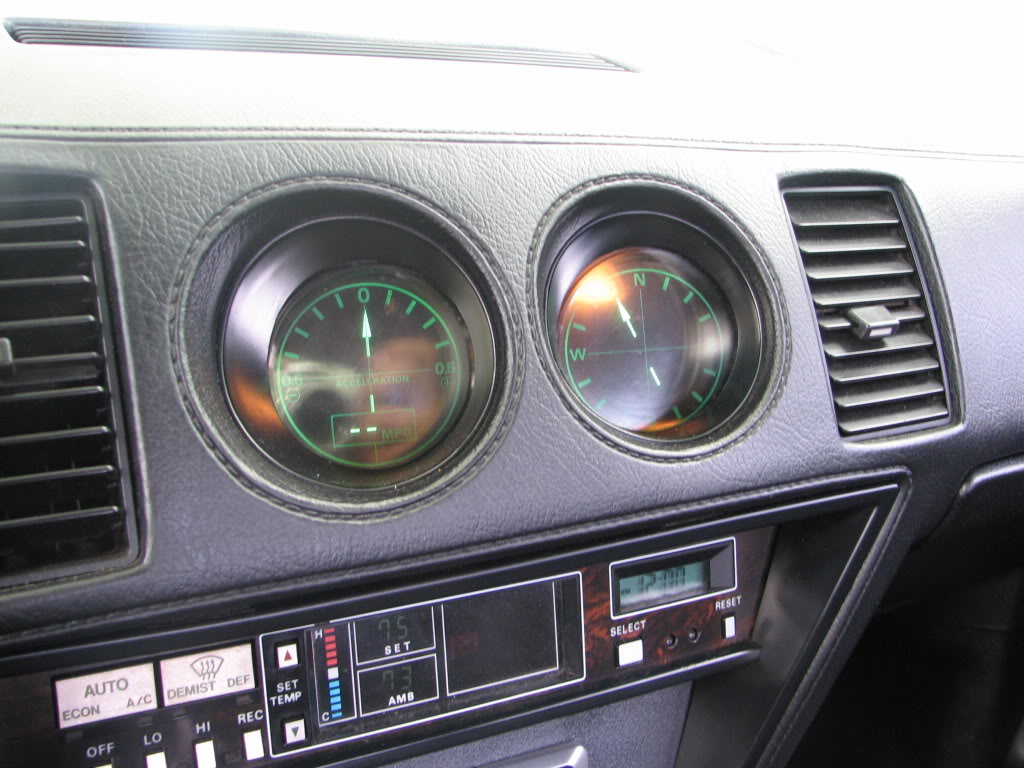
For those of you that want to recalibrate the compass which probably doesn't work, here is the quick and easy procedure:
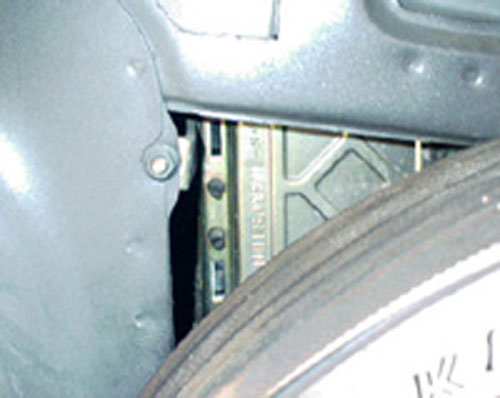
- Locate the compass control unit next to the spare tire.
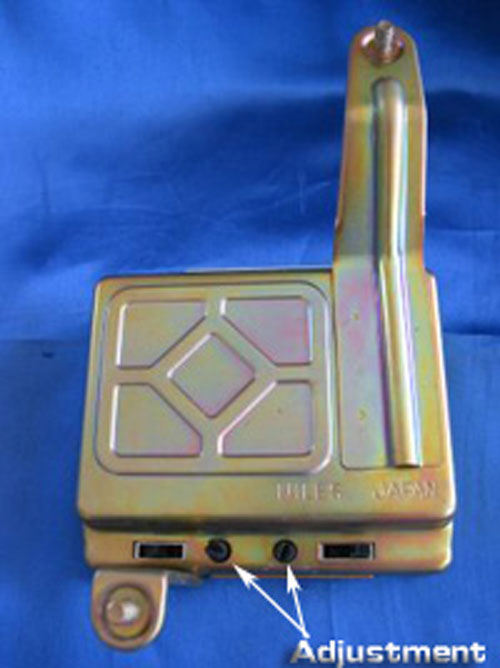
It has 2 switches and 2 dials on it. Also there is printed on the case of the unit, the letters "N" and "E". From now on the switch and dial closest to the "N" will be called "N Switch" and "N dial", and the ones closest to the "E" will be called "E switch" and "E Dial". This should make things clearer.
- Get a compass and face the car exactly North.
- If your the car's compass is more only 1 increment off, then go to step 6
- If the cars compass is off to the west, then move the N Switch to the "+" position. If the needle is off to the East, then move the N Switch to the "-" position.
- According to the FSM, this should bring the needle to within 1 increment of North. However it didn't with my car. If it doesn't with your car, just wait 20 seconds or so, and then move the N Switch back to the neutral position.
- Turn the N Dial so that the needle moves towards North. Go past North by 1 increment, and then go back to North. Make sure the needle is indicating exactly North.
- Turn your car to face exactly East. If your car's compass is off by only 1 increment, then go to step 10
- If the needle is off to the North, then move the E Switch to the "+" position. If the needle is off to the South, then move the switch to the "-" position.
- After step 9, your needle should be within 1 increment of East, however, my car wasn't and maybe yours wont either, if this is the case, then just leave the switch there for about 20 seconds, and then move the E Switch back to the neutral position. If it does move to within 1 increment, then move the E Switch back to neutral also.
- Turn the E Dial so that the needle moves towards East, and go 1 increment past East. Then move it back to indicate exactly East.
Demagnetizing your Roof[edit]
If the above fails, you can try to demagnetize the roof section of your Z. The Steps are as Follows:
- Spread a sheet or thin cloth over your roof.
- Using a Demagnetizer designed for open reel tapes, Move it in a circular motion while lightly touching the cloth.
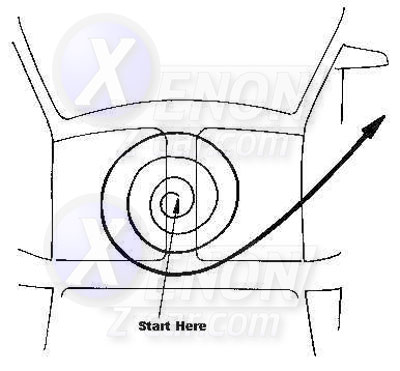
- The roof at this time should be demagnetised.
Extra arrows or missing arrows on your compass[edit]
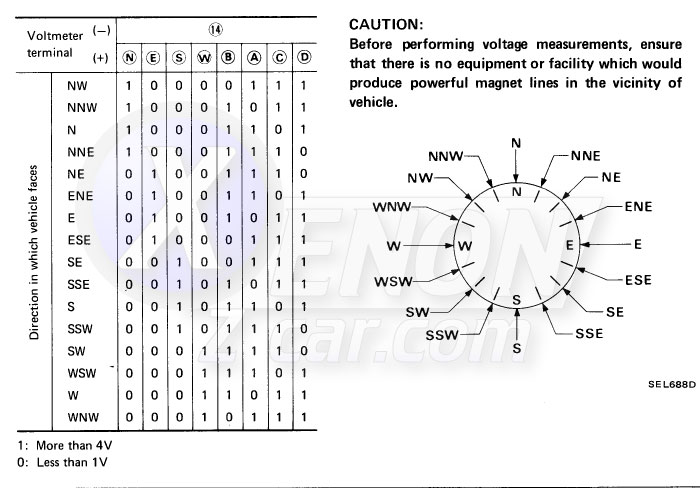
Extra arrows or missing arrows on your compass can be corrected with the following troubleshooting steps: Compass Amplifier Output Check
- Using a Directional magnet, determine the direction the car is facing
- With the ignition in the on position, check the voltage across the terminals as indicated in the chart below
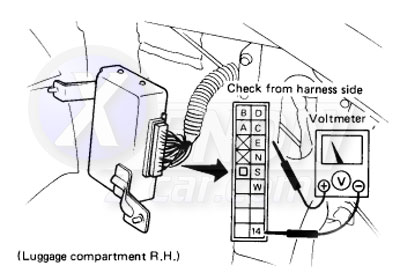
If this still fails to correct your issue or if all the arrows are lit, see the steps below to check the input to the gauge cluster.
Compass Input Check[edit]
If all the arrows are lit on your compass, the gauge or harness may be faulty. Below are the steps to check this.
- Remove the radio and A/C control assembly from the dash and remove the Combination gauges with the harness connected.
- With the ignition in the on position, check the voltages across the terminals as indicated in the chart below
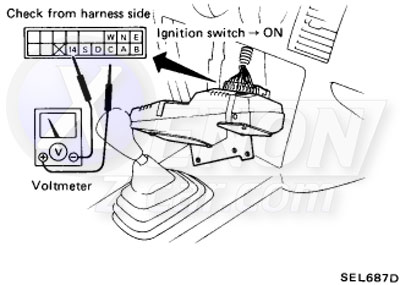
Output and Input Voltage chart[edit]
If the above still fails to correct your issue, the problem may be the direction sensor itself.
Direction Sensor Check[edit]
- Disconnect the harness connector from the direction sensor amplifier.
- Measure the resistance values between the terminals on the harness side.
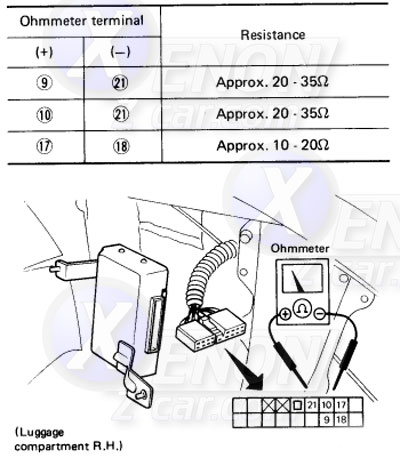
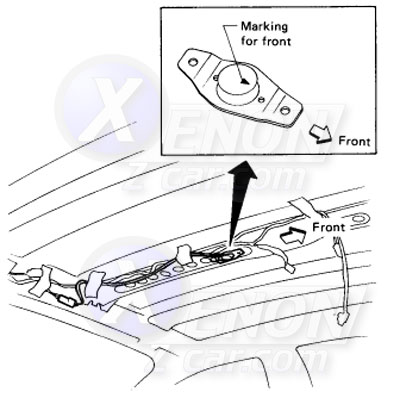
If this still does not correct the issue, Replace the Direction Sensor.
Your Digital Compass should now work correctly.
Sources Used[edit]
- 1984-1988 Nissan 300ZX Factory Service Manual
- Compass image from: zeefsranger