
Z31/computerpinout php: Difference between revisions
CleanupBot (talk | contribs) Residue cleanup: re-convert body verbatim from archived source; restores 3 dropped text blocks |
CleanupBot (talk | contribs) Rewrite 3 dev.z31library.com link(s) to z31library.com |
||
| Line 1: | Line 1: | ||
{{ImportedFrom|site=Xenonzcar|title=Z31 Computer Pin Out|url=https:// | {{ImportedFrom|site=Xenonzcar|title=Z31 Computer Pin Out|url=https://z31library.com/xenonzcar_archive/z31/computerpinout.php.html|archive=https://z31library.com/xenonzcar_archive/z31/computerpinout.php.html|fetched=2026-05-15}} | ||
== Z31 Computer Pin Out == | == Z31 Computer Pin Out == | ||
| Line 7: | Line 7: | ||
=== ECCS Location === | === ECCS Location === | ||
https:// | https://z31library.com/xenonzcar_archive/z31/images/ECU/ECCU1.png | ||
The ECCS or Computer for the Z31 is located behind the passenger's kick panel. This is the small panel on the outer wall right below the glovebox. You will need to remove 2 screws to get the panel off. | The ECCS or Computer for the Z31 is located behind the passenger's kick panel. This is the small panel on the outer wall right below the glovebox. You will need to remove 2 screws to get the panel off. | ||
Latest revision as of 22:54, 20 October 2026
Imported page. This page was converted from an archived copy of "Z31 Computer Pin Out" (Xenonzcar, fetched 2026-05-15). The conversion was mechanical, so tables, links and formatting may contain conversion artefacts. Compare against the archived copy if something looks wrong. The content belongs to its original authors.
Z31 Computer Pin Out[edit]
The Z31 had a few changes throughout the years and models of the wiring to the ECU. Here we will try to show you the differences with a Pinout Chart.
ECCS Location[edit]
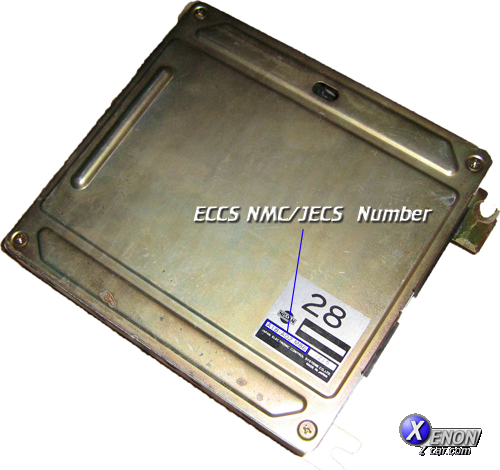
The ECCS or Computer for the Z31 is located behind the passenger's kick panel. This is the small panel on the outer wall right below the glovebox. You will need to remove 2 screws to get the panel off.
There are three connectors that plug into the ECCM. These connections can sometimes corrode and cause Driveability issues. Cleaning these will resolve some problems but sometimes for Diagnostic procedures you will need to check the pinout on sensors. The diagram below will show you what each pin connects to.
Pinout Diagram[edit]
×