
Z31/DashboardRemoval php: Difference between revisions
CleanupBot (talk | contribs) Residue cleanup: re-convert body verbatim from archived source; restores 3 dropped text blocks |
CleanupBot (talk | contribs) Rewrite 8 dev.z31library.com link(s) to z31library.com |
||
| Line 1: | Line 1: | ||
{{ImportedFrom|site=Xenonzcar|title=XenonZcar|url=https:// | {{ImportedFrom|site=Xenonzcar|title=XenonZcar|url=https://z31library.com/xenonzcar_archive/z31/DashboardRemoval.php.html|archive=https://z31library.com/xenonzcar_archive/z31/DashboardRemoval.php.html|fetched=2026-05-15}} | ||
== XenonZcar.com - Z31 Dashboard Removal == | == XenonZcar.com - Z31 Dashboard Removal == | ||
| Line 5: | Line 5: | ||
When I had to replace my heater core as it was leaking, I learned that I would need to remove the dashboard. I thought to my self this will take forever but it was not that hard to do and only took about one hour. Below is the steps I took to pull the dash. | When I had to replace my heater core as it was leaking, I learned that I would need to remove the dashboard. I thought to my self this will take forever but it was not that hard to do and only took about one hour. Below is the steps I took to pull the dash. | ||
[https:// | [https://z31library.com/xenonzcar_archive/z31/images/Dashboard/Dashbig.gif https://z31library.com/xenonzcar_archive/z31/images/Dashboard/Dashbig.png] | ||
Click to Enlarge | Click to Enlarge | ||
| Line 39: | Line 39: | ||
#* Pull the stereo and climate control assembly out in one piece, disconnect connectors, and remove. | #* Pull the stereo and climate control assembly out in one piece, disconnect connectors, and remove. | ||
#* Locate and remove the 4 screws holding the dash to the mounting plates. | #* Locate and remove the 4 screws holding the dash to the mounting plates. | ||
https:// | https://z31library.com/xenonzcar_archive/z31/images/Dashboard/Heaterout.png | ||
# <br />Remove the driver-side lower dash cover: | # <br />Remove the driver-side lower dash cover: | ||
#* Remove 3 screws holding it in place. | #* Remove 3 screws holding it in place. | ||
| Line 63: | Line 63: | ||
#* Remove the 19mm nut holding the wheel. | #* Remove the 19mm nut holding the wheel. | ||
#* Use a puller or loosen nut 3 turns and rock wheel to free it. | #* Use a puller or loosen nut 3 turns and rock wheel to free it. | ||
https:// | https://z31library.com/xenonzcar_archive/z31/images/Dashboard/wheelnut.png | ||
# <br />Disconnect harnesses and remove column switches:<br /> <br />Loosen the single Phillips screw, disconnect connectors, and remove switches off the shaft. | # <br />Disconnect harnesses and remove column switches:<br /> <br />Loosen the single Phillips screw, disconnect connectors, and remove switches off the shaft. | ||
# <br />Remove passenger-side lower dash cover: | # <br />Remove passenger-side lower dash cover: | ||
| Line 75: | Line 75: | ||
#* Remove 4 screws across the top of the dash (10mm socket). | #* Remove 4 screws across the top of the dash (10mm socket). | ||
#* Be careful not to hit the windshield. | #* Be careful not to hit the windshield. | ||
https:// | https://z31library.com/xenonzcar_archive/z31/images/Dashboard/ventremove1big.gif https://z31library.com/xenonzcar_archive/z31/images/Dashboard/ventremove2big.gif | ||
# <br />Remove the dash:<br /> <br />Carefully pull the dash out and away from the steering column, ensuring all connectors are unplugged. | # <br />Remove the dash:<br /> <br />Carefully pull the dash out and away from the steering column, ensuring all connectors are unplugged. | ||
#* For 84–86 analog dashes: disconnect the speedometer cable first to avoid breaking the clip. | #* For 84–86 analog dashes: disconnect the speedometer cable first to avoid breaking the clip. | ||
Latest revision as of 22:50, 20 October 2026
Imported page. This page was converted from an archived copy of "XenonZcar" (Xenonzcar, fetched 2026-05-15). The conversion was mechanical, so tables, links and formatting may contain conversion artefacts. Compare against the archived copy if something looks wrong. The content belongs to its original authors.
XenonZcar.com - Z31 Dashboard Removal[edit]
When I had to replace my heater core as it was leaking, I learned that I would need to remove the dashboard. I thought to my self this will take forever but it was not that hard to do and only took about one hour. Below is the steps I took to pull the dash.
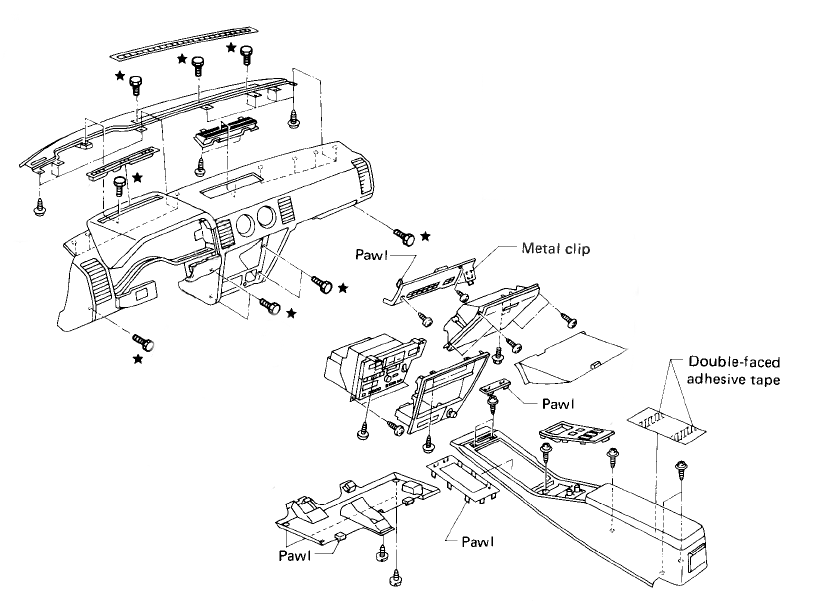
Click to Enlarge
- WARNING* - Do this modification at your own risk. We Are not responsable for any issues of your own doing.
Tools Needed[edit]
- Regular 10mm socket
- 19mm socket
- Socket driver or Ratchet
- 3" extension
- #2 Phillips screwdriver
- #3 Phillips screwdriver
- 2 Small flathead screwdrivers (One with a slight Bend is best so break out the old one and bend it up)
- Steering wheel puller
Dashboard Removal Procedure[edit]
Remove the stereo and heater control assembly:- Pull out the ashtray.
- Remove the 4 stereo/climate control trim screws:
- 2 screws behind the ashtray.
- 2 black screws on top (use 10mm socket if tight).
- Pull the trim out, disconnect cigarette lighter and ashtray lights, and remove the trim.
- Remove the 4 stereo/climate control mounting screws (10mm).
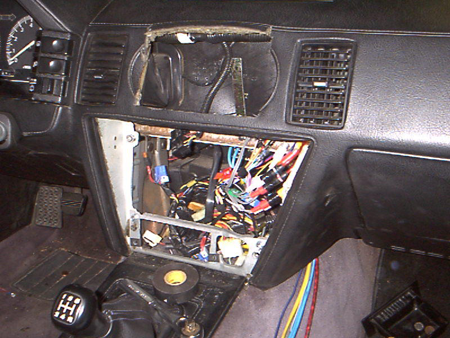
- Pull the stereo and climate control assembly out in one piece, disconnect connectors, and remove.
- Locate and remove the 4 screws holding the dash to the mounting plates.
Remove the driver-side lower dash cover:- Remove 3 screws holding it in place.
- Pull the trim down and disconnect the foot light.
- Unplug driver's side dash harness and remove retaining screw.
- If digital dash: remove nut/bolt holding power supply, unplug, and remove the supply.
Remove the steering wheel column covers:- Remove 4 Phillips head screws:
- 2 outer screws hold the halves together.
- 2 inner screws hold the cover to the combo switch.
- Remove the key light connector and free the cover.
- Be careful not to crack the cover when removing over the cruise control switch (GL models).
Remove the steering wheel:- Pry off the horn cover:
- GL: start at the top and pull.
- GLL: pry from the bottom.
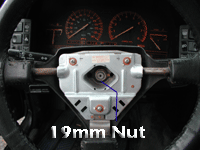
- Remove the 19mm nut holding the wheel.
- Use a puller or loosen nut 3 turns and rock wheel to free it.
Disconnect harnesses and remove column switches:
Loosen the single Phillips screw, disconnect connectors, and remove switches off the shaft.
Remove passenger-side lower dash cover:- Remove 2 screws at the bottom of the panel.
- Pull trim down and disconnect foot light.
- Remove plastic clip and screw to access passenger kick panel and harness connectors.
- Disconnect harness connectors and remove the lower dash bolt (10mm).
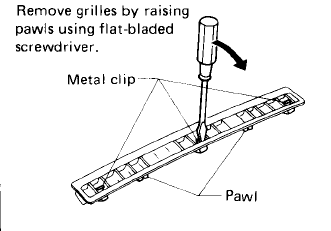
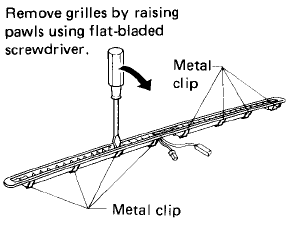
Remove upper dash windshield vents:- Use small screwdriver to push metal tabs and pry vent up carefully.
- Remove 4 screws across the top of the dash (10mm socket).
- Be careful not to hit the windshield.
Remove the dash:
Carefully pull the dash out and away from the steering column, ensuring all connectors are unplugged.- For 84–86 analog dashes: disconnect the speedometer cable first to avoid breaking the clip.