
Z31/sensors php: Difference between revisions
CleanupBot (talk | contribs) Residue cleanup: re-convert body verbatim from archived source; restores 2 dropped text blocks |
CleanupBot (talk | contribs) m Rewrite 3 dev.z31library.com link(s) to z31library.com |
||
| Line 1: | Line 1: | ||
{{ImportedFrom|site=Xenonzcar|title=Z31 Sensor Guide|url=https:// | {{ImportedFrom|site=Xenonzcar|title=Z31 Sensor Guide|url=https://z31library.com/xenonzcar_archive/z31/sensors.php.html|archive=https://z31library.com/xenonzcar_archive/z31/sensors.php.html|fetched=2026-05-15}} | ||
== Z31 Sensor Guide == | == Z31 Sensor Guide == | ||
| Line 13: | Line 13: | ||
=== Interactive Sensor Location Diagram === | === Interactive Sensor Location Diagram === | ||
https:// | https://z31library.com/xenonzcar_archive/z31/images/Sensors/sensorslocation.png | ||
Hover or click highlighted areas for individual sensor guides. | Hover or click highlighted areas for individual sensor guides. | ||
Latest revision as of 22:55, 20 October 2026
Imported page. This page was converted from an archived copy of "Z31 Sensor Guide" (Xenonzcar, fetched 2026-05-15). The conversion was mechanical, so tables, links and formatting may contain conversion artefacts. Compare against the archived copy if something looks wrong. The content belongs to its original authors.
Z31 Sensor Guide[edit]
Here you will find a listing of all the sensors that make the Z31 Run correctly. Please Bear with us as this page is still under construction..
- WARNING* - Do this diagnosis/mods at your own risk. We Are not responsable for any issues of your own doing.
Interactive Sensor Location Diagram[edit]
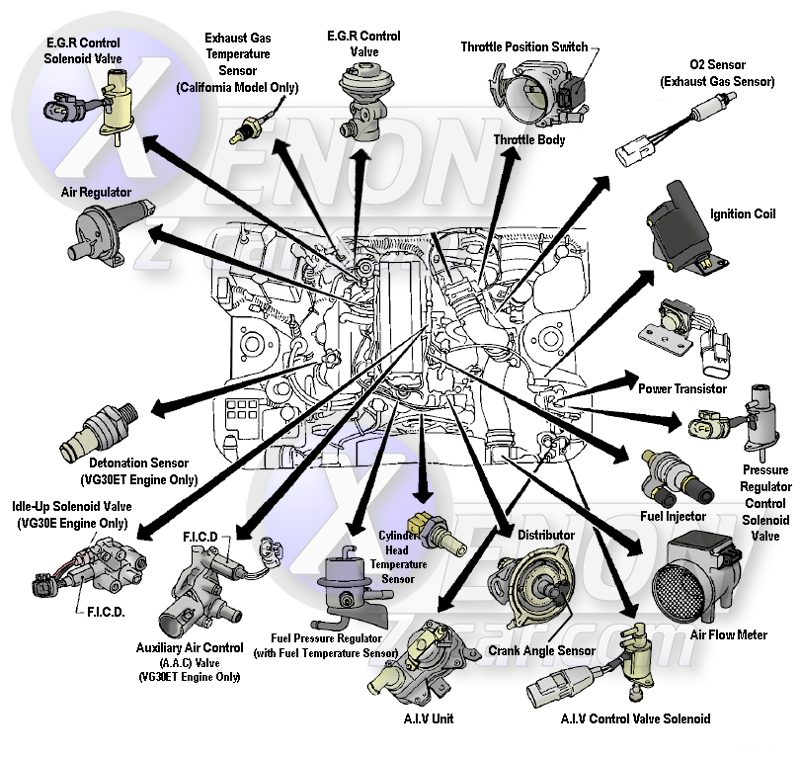
Hover or click highlighted areas for individual sensor guides.