
Z31/Switchpodbulbs: Difference between revisions
m XenonzcarImporter moved page Sites/Xenonzcar/z31/Switchpodbulbs to Z31/Switchpodbulbs without leaving a redirect: Flatten Sites/ namespace; provenance preserved via ImportedFrom banner |
CleanupBot (talk | contribs) Rewrite 9 dev.z31library.com link(s) to z31library.com |
||
| (3 intermediate revisions by 2 users not shown) | |||
| Line 1: | Line 1: | ||
{{ImportedFrom|site=Xenonzcar|title=Z31 Replacing Your Switch Pod Lamps|url= | {{ImportedFrom|site=Xenonzcar|title=Z31 Replacing Your Switch Pod Lamps|url=https://z31library.com/xenonzcar_archive/z31/Switchpodbulbs.html|archive=https://z31library.com/xenonzcar_archive/z31/Switchpodbulbs.html|fetched=2026-05-15}} | ||
=== Z31 Replacing Your Switch Pod Lamps === | |||
The Z31 300zx has many small bulbs that are hard to locate and replace. One of these is the switch pod bulbs. Here is the process to replace them. | The Z31 300zx has many small bulbs that are hard to locate and replace. One of these is the switch pod bulbs. Here is the process to replace them. | ||
== Tools Needed: == | |||
* Phillips Screw Driver | * Phillips Screw Driver | ||
| Line 8: | Line 12: | ||
* 10mm Socket | * 10mm Socket | ||
== | == Parts Needed: == | ||
[http://www.courtesyparts.com/betasite/kb_search_result.php?chassis_id=22&keywords=25170A&Submit_Button=Go&cat=1 Nissan part # 25170A] | * [http://www.courtesyparts.com/betasite/kb_search_result.php?chassis_id=22&keywords=25170A&Submit_Button=Go&cat=1 Nissan part # 25170A] | ||
== | == Process: == | ||
* Take the lower panel on the drivers side off. This will be held on with 3 phillips head screws. | * Take the lower panel on the drivers side off. This will be held on with 3 phillips head screws. | ||
* Now lay on the floor and take a 10mm socket and short extension for the left side and a 10 inch extension with a universal joint for the right. There is 1 nut on each side to remove the entire switch. | * Now lay on the floor and take a 10mm socket and short extension for the left side and a 10 inch extension with a universal joint for the right. There is 1 nut on each side to remove the entire switch. | ||
https://z31library.com/xenonzcar_archive/z31/images/Replacing%20the%20podbulbs/10mm.jpg | |||
* Once you've got the nut off take a flat screwdriver and slide it in the top part of the switch and press downward and slowly pull the switch out as far as the wires will allow. | * Once you've got the nut off take a flat screwdriver and slide it in the top part of the switch and press downward and slowly pull the switch out as far as the wires will allow. | ||
https://z31library.com/xenonzcar_archive/z31/images/Replacing%20the%20podbulbs/Pry.jpg | |||
* Push on the appropriate electrical connector and slide the connector out of the switch. | * Push on the appropriate electrical connector and slide the connector out of the switch. | ||
https://z31library.com/xenonzcar_archive/z31/images/Replacing%20the%20podbulbs/Disconect-electrical.jpg | |||
* Once the switch is out, remove the finisher panel by popping it loose. | * Once the switch is out, remove the finisher panel by popping it loose. | ||
* Remove the three screws from the top and bottom and pull the whole electrical switch out. | * Remove the three screws from the top and bottom and pull the whole electrical switch out. | ||
https://z31library.com/xenonzcar_archive/z31/images/Replacing%20the%20podbulbs/Last-Screw.jpg | |||
https://z31library.com/xenonzcar_archive/z31/images/Replacing%20the%20podbulbs/2screws.jpg | |||
Now you can get at the 2 screws that hold it together. GL and GLL cars have different bulb cover colors depend on what model car you have. GL have orange bulb covers and GLL has green, Latter years have no bulb covers. You will need to correct bulb with the cover as there are 4 different ones available. | Now you can get at the 2 screws that hold it together. GL and GLL cars have different bulb cover colors depend on what model car you have. GL have orange bulb covers and GLL has green, Latter years have no bulb covers. You will need to correct bulb with the cover as there are 4 different ones available. | ||
* Once you remove the 'T' shape bulbs by pulling them off the electrical leads you will see what color you need. | |||
https://z31library.com/xenonzcar_archive/z31/images/Replacing%20the%20podbulbs/Dissamb.jpg | |||
https://z31library.com/xenonzcar_archive/z31/images/Replacing%20the%20podbulbs/Bulb-out.jpg | |||
Assembly is the reverse of Disassembly. | Assembly is the reverse of Disassembly. | ||
''' NOTE: A local Nissan dealer can get the bulb you need. It is best to bring your old one in to match them up as they are getting harder to find and even with the part number mistakes have happened.''' | |||
Sources used on this page: | |||
* [[Z31/reference|1984-1988 Nissan 300ZX Factory Service Manual]] | |||
* [http://www.courtesyparts.com/ Courtesy Nissan] | |||
* Written by: XenonXIII | |||
[[Category:Imported from Xenonzcar]] | [[Category:Imported from Xenonzcar]] | ||
Latest revision as of 22:53, 20 October 2026
Imported page. This page was converted from an archived copy of "Z31 Replacing Your Switch Pod Lamps" (Xenonzcar, fetched 2026-05-15). The conversion was mechanical, so tables, links and formatting may contain conversion artefacts. Compare against the archived copy if something looks wrong. The content belongs to its original authors.
Z31 Replacing Your Switch Pod Lamps[edit]
The Z31 300zx has many small bulbs that are hard to locate and replace. One of these is the switch pod bulbs. Here is the process to replace them.
Tools Needed:[edit]
- Phillips Screw Driver
- Flat head Screw driver
- Ratchet
- 10mm Socket
Parts Needed:[edit]
Process:[edit]
- Take the lower panel on the drivers side off. This will be held on with 3 phillips head screws.
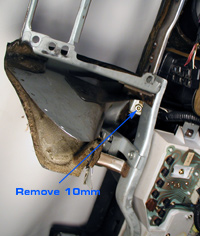
- Now lay on the floor and take a 10mm socket and short extension for the left side and a 10 inch extension with a universal joint for the right. There is 1 nut on each side to remove the entire switch.
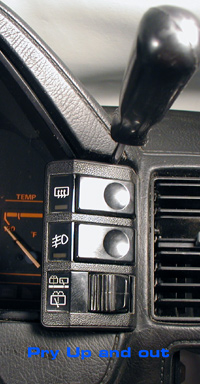
- Once you've got the nut off take a flat screwdriver and slide it in the top part of the switch and press downward and slowly pull the switch out as far as the wires will allow.
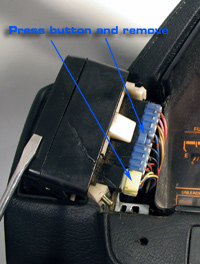
- Push on the appropriate electrical connector and slide the connector out of the switch.
- Once the switch is out, remove the finisher panel by popping it loose.
- Remove the three screws from the top and bottom and pull the whole electrical switch out.
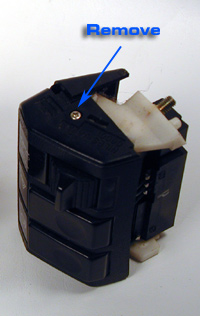
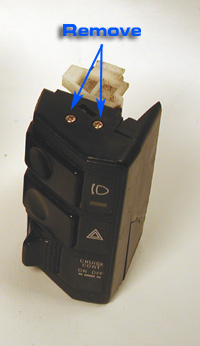
Now you can get at the 2 screws that hold it together. GL and GLL cars have different bulb cover colors depend on what model car you have. GL have orange bulb covers and GLL has green, Latter years have no bulb covers. You will need to correct bulb with the cover as there are 4 different ones available.
- Once you remove the 'T' shape bulbs by pulling them off the electrical leads you will see what color you need.
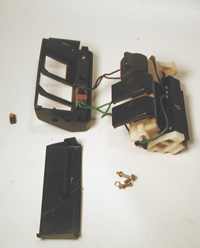
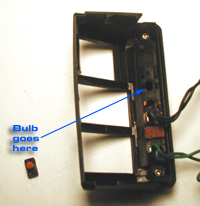
Assembly is the reverse of Disassembly. NOTE: A local Nissan dealer can get the bulb you need. It is best to bring your old one in to match them up as they are getting harder to find and even with the part number mistakes have happened.
Sources used on this page:
- 1984-1988 Nissan 300ZX Factory Service Manual
- Courtesy Nissan
- Written by: XenonXIII