
Z31/Illuminated300zxbar php: Difference between revisions
Inline image refs: rewrite to local archive; clean empty image artifacts |
CleanupBot (talk | contribs) Rewrite 7 dev.z31library.com link(s) to z31library.com |
||
| (2 intermediate revisions by one other user not shown) | |||
| Line 1: | Line 1: | ||
{{ImportedFrom|site=Xenonzcar|title=Z31 1984-1986 Tail Lamp Bar Illumination Modification|url=https:// | {{ImportedFrom|site=Xenonzcar|title=Z31 1984-1986 Tail Lamp Bar Illumination Modification|url=https://z31library.com/xenonzcar_archive/z31/Illuminated300zxbar.php.html|archive=https://z31library.com/xenonzcar_archive/z31/Illuminated300zxbar.php.html|fetched=2026-05-15}} | ||
== Z31 1984-1986 Tail Lamp Bar Illumination Modification == | == Z31 1984-1986 Tail Lamp Bar Illumination Modification == | ||
| Line 5: | Line 5: | ||
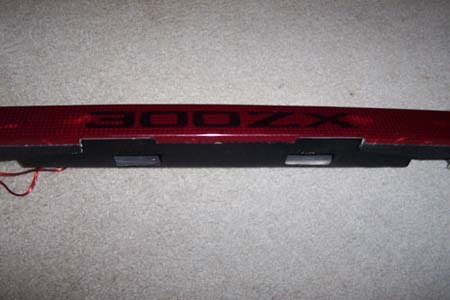
Illuminating your 300ZX panel is a simple and inexpensive modification you can do the make your Z stand out. The following is a write up that was done some time ago. | Illuminating your 300ZX panel is a simple and inexpensive modification you can do the make your Z stand out. The following is a write up that was done some time ago. | ||
https:// | https://z31library.com/xenonzcar_archive/z31/images/ilumated%20300zx%20bar/1.jpg | ||
==== Items needed ==== | ==== Items needed ==== | ||
| Line 35: | Line 35: | ||
* Reinstall the rear panel and replace the interior trim. Confirm everything is secure and test the new lighting. | * Reinstall the rear panel and replace the interior trim. Confirm everything is secure and test the new lighting. | ||
https:// | https://z31library.com/xenonzcar_archive/z31/images/ilumated%20300zx%20bar/Rearlicense300ZX1.jpg | ||
https:// | https://z31library.com/xenonzcar_archive/z31/images/ilumated%20300zx%20bar/Rearlicense300ZX2.jpg | ||
https:// | https://z31library.com/xenonzcar_archive/z31/images/ilumated%20300zx%20bar/Rearlicense300ZX3.jpg | ||
https:// | https://z31library.com/xenonzcar_archive/z31/images/ilumated%20300zx%20bar/Rearlicense300ZX5.jpg | ||
=== Sources Used === | === Sources Used === | ||
[ | [[Z31/z31fsm php|1984-1988 Nissan 300ZX Factory Service Manual]] | ||
* Writen by: Darren Kemp | |||
[[Category:Imported from Xenonzcar]] | [[Category:Imported from Xenonzcar]] | ||
Latest revision as of 22:52, 20 October 2026
Imported page. This page was converted from an archived copy of "Z31 1984-1986 Tail Lamp Bar Illumination Modification" (Xenonzcar, fetched 2026-05-15). The conversion was mechanical, so tables, links and formatting may contain conversion artefacts. Compare against the archived copy if something looks wrong. The content belongs to its original authors.
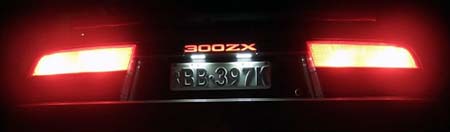
Z31 1984-1986 Tail Lamp Bar Illumination Modification[edit]
Illuminating your 300ZX panel is a simple and inexpensive modification you can do the make your Z stand out. The following is a write up that was done some time ago.
Items needed[edit]
- Tools to remove the rear panel (screwdrivers, trim tools, etc.)
- 300mm LED strip light kit (white, waterproof, 12V, with wiring harness)
- Thin sheet aluminum or steel for mounting
- Glue and/or small screws
- Can of Night Shades or similar spray-on tinting
- Plastic light diffuser or LED-compatible cover
- Wire connectors and heat shrink tubing (for safe LED wiring)
Process[edit]
- Remove the rear trim and undo the 4 screws holding the rear panel on.
- Unplug the number plate lights and remove the panel.
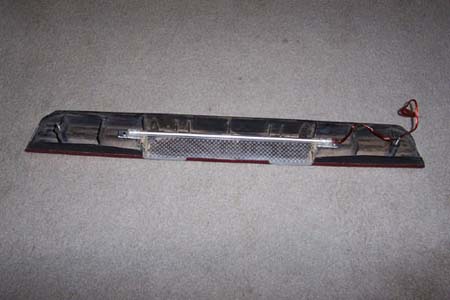
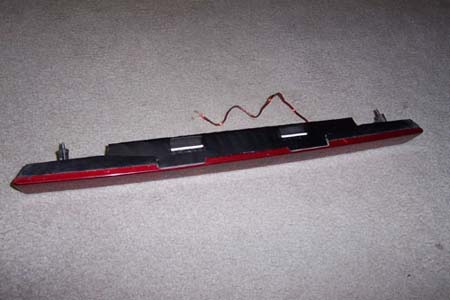
- Carefully pry apart the backing from the red plastic section (use trim tools or a flat screwdriver—be gentle to avoid breaking tabs).
- Trim or cut away some of the backing so you can see the "300ZX" writing; it's normal to remove the two inner screw bosses here.
- Test-fit your LED strip—trim the backing as needed so the LED strip will fit evenly behind the lettering.
- Sand the back of the "300ZX" lettering to allow more light to pass through.
- Tint the back of the lettering (using Night Shades or similar) so the letters still look black during the day.
- Reassemble the two panel pieces.
- Cut a plastic light diffuser or LED-compatible cover to size and fit it between the panel and the LED strip to create even light distribution.
- Secure the LED strip to the panel backing using glue or screws and an aluminum mounting plate for stability. Make sure the strip is straight and centered for best results.
- If the LED strip is fragile, handle it with care; replace if necessary.
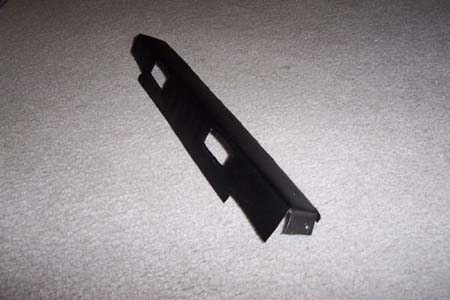
- Make a thin aluminum reflector panel to improve light output and create a cleaner appearance.
- Glue or screw the aluminum reflector in place.
- Wire the LED strip into the existing number plate light wiring. For easy removal, add a waterproof plug connector.
- Reinstall the rear panel and replace the interior trim. Confirm everything is secure and test the new lighting.
Sources Used[edit]
1984-1988 Nissan 300ZX Factory Service Manual
- Writen by: Darren Kemp