
Z31/Automaticclimatecontroldiag php: Difference between revisions
m XenonzcarImporter moved page Sites/Xenonzcar/z31/Automaticclimatecontroldiag php to Z31/Automaticclimatecontroldiag php without leaving a redirect: Flatten Sites/ namespace; provenance preserved via ImportedFrom banner |
CleanupBot (talk | contribs) Rewrite 6 dev.z31library.com link(s) to z31library.com |
||
| (5 intermediate revisions by 2 users not shown) | |||
| Line 1: | Line 1: | ||
{{ImportedFrom|site=Xenonzcar|title=Testing of the Nissan 300zx Z31 Automatic Climate Control|url= | {{ImportedFrom|site=Xenonzcar|title=Testing of the Nissan 300zx Z31 Automatic Climate Control|url=https://z31library.com/xenonzcar_archive/z31/Automaticclimatecontroldiag.php.html|archive=https://z31library.com/xenonzcar_archive/z31/Automaticclimatecontroldiag.php.html|fetched=2026-05-15}} | ||
== Testing of the Nissan 300zx Z31 Automatic Climate Control == | == Testing of the Nissan 300zx Z31 Automatic Climate Control == | ||
''WARNING'' - Do this diagnosis/mods at your own risk. We Are not responsable for any issues of your own doing. | ''WARNING'' - Do this diagnosis/mods at your own risk. We Are not responsable for any issues of your own doing.https://z31library.com/xenonzcar_archive/z31/images/Interior/his14.jpg | ||
 |  | ||
| Line 11: | Line 11: | ||
There are two parts to self-diagnosing the automatic climate control. The first part deals with the input system (sensors, etc). The second part deals with the output system (air-mix doors, air outlet doors, actuators, etc). Both parts are activated by shorting prongs on a connector found behind the Passenger side kick panel under the glove box. The connector is white/yellow, square, has three prongs, is not connected to anything, and has a metal bracket (with a screw hole) attached to it. Here is what the inside of the connector housing looks like - note the three prongs: | There are two parts to self-diagnosing the automatic climate control. The first part deals with the input system (sensors, etc). The second part deals with the output system (air-mix doors, air outlet doors, actuators, etc). Both parts are activated by shorting prongs on a connector found behind the Passenger side kick panel under the glove box. The connector is white/yellow, square, has three prongs, is not connected to anything, and has a metal bracket (with a screw hole) attached to it. Here is what the inside of the connector housing looks like - note the three prongs: | ||
https://z31library.com/xenonzcar_archive/z31/images/AC%20repair/AutoAC-Testconnector.png | |||
=== Input System === | === Input System === | ||
| Line 19: | Line 21: | ||
Look at the display. The Set Temp window will show a number between 0 and 15. You can change this number by using the temperature setting buttons. It identifies which sensor you are looking at. The number in the ambient temperature window is your diagnostic code. Here is a break down of what the numbers and codes mean: | Look at the display. The Set Temp window will show a number between 0 and 15. You can change this number by using the temperature setting buttons. It identifies which sensor you are looking at. The number in the ambient temperature window is your diagnostic code. Here is a break down of what the numbers and codes mean: | ||
| Set Temp # | {| class="wikitable" | ||
|- | ! Set Temp # | ||
| 0 | Foot temp. sensor | Ok if close to actual inside temp. 2°F (-17°C) - Open sensor 181°F (83°C) - Shorted sensor | | ! Checking Item | ||
| 1 | Heat temp. sensor | Ok if close to actual inside temp. 2°F (-17°C) - Open sensor 181°F (83°C) - Shorted sensor | | ! Diagnostic Code and Meaning | ||
| 2 | Floor duct temp. sensor | Ok if close to actual inside temp. 2°F (-17°C) - Open sensor 181°F (83°C) - Shorted sensor | | |- | ||
| 3 | Vent duct temp. sensor | Ok if close to actual inside temp. 2°F (-17°C) - Open sensor 181°F (83°C) - Shorted sensor | | | 0 | ||
| 4 | Defroster duct temp. sensor | Ok if close to actual inside temp. 2°F (-17°C) - Open sensor 181°F (83°C) - Shorted sensor | | | Foot temp. sensor | ||
| 5 | Water temperature switch | 2°F (-17°C) - water temp < 104°F 181°F (83°C) - water temp > 104°F | | | Ok if close to actual inside temp.<br />2°F (-17°C) - Open sensor<br />181°F (83°C) - Shorted sensor | ||
| 6 | Sunload sensor | 32°F (0°C) to 104°F (40°C) — OK if increases with more light | | |- | ||
| 7 | Temp diff between foot and head | 32°F (0°C) — No difference 90°F (32°C) — 2°C difference 147°F (64°C) — 7°F difference | | | 1 | ||
| 8 | Feedback Potentio (Lower) | Difference from full cool to full hot: > 40°F (10°C) — Standard is 68°F (20°C) Refer to output step 1 | | | Heat temp. sensor | ||
| 9 | Feedback Potentio (Upper) | Difference from full cool to full hot: > 40°F (10°C) — Standard is 68°F (20°C) Refer to output step 1 | | | Ok if close to actual inside temp.<br />2°F (-17°C) - Open sensor<br />181°F (83°C) - Shorted sensor | ||
|- | |||
| 2 | |||
| Floor duct temp. sensor | |||
| Ok if close to actual inside temp.<br />2°F (-17°C) - Open sensor<br />181°F (83°C) - Shorted sensor | |||
|- | |||
| 3 | |||
| Vent duct temp. sensor | |||
| Ok if close to actual inside temp.<br />2°F (-17°C) - Open sensor<br />181°F (83°C) - Shorted sensor | |||
|- | |||
| 4 | |||
| Defroster duct temp. sensor | |||
| Ok if close to actual inside temp.<br />2°F (-17°C) - Open sensor<br />181°F (83°C) - Shorted sensor | |||
|- | |||
| 5 | |||
| Water temperature switch | |||
| 2°F (-17°C) - water temp < 104°F<br />181°F (83°C) - water temp > 104°F | |||
|- | |||
| 6 | |||
| Sunload sensor | |||
| 32°F (0°C) to 104°F (40°C) — OK if increases with more light | |||
|- | |||
| 7 | |||
| Temp diff between foot and head | |||
| 32°F (0°C) — No difference<br />90°F (32°C) — 2°C difference<br />147°F (64°C) — 7°F difference | |||
|- | |||
| 8 | |||
| Feedback Potentio (Lower) | |||
| Difference from full cool to full hot:<br />> 40°F (10°C) — Standard is 68°F (20°C)<br />Refer to output step 1 | |||
|- | |||
| 9 | |||
| Feedback Potentio (Upper) | |||
| Difference from full cool to full hot:<br />> 40°F (10°C) — Standard is 68°F (20°C)<br />Refer to output step 1 | |||
|} | |||
=== Output System === | === Output System === | ||
| Line 56: | Line 91: | ||
'''4) Water cock''' | '''4) Water cock''' | ||
Watch the [ | Watch the [https://z31library.com/xenonzcar_archive/z31/images/Digital%20Climate%20control/watercock1.jpg water cock] (near the battery) and/or display, The water cock should be on for 8 seconds and off for 8 seconds | ||
'''5) Compressor Clutch''' | '''5) Compressor Clutch''' | ||
| Line 65: | Line 100: | ||
Hope this helps with troubleshooting the Factory Automatic Climate Controls in your Z. | Hope this helps with troubleshooting the Factory Automatic Climate Controls in your Z. | ||
=== Sources Used === | |||
* [https://z31library.com/xenonzcar_archive/z31/z31fsm.php 1984-1988 Nissan 300ZX Factory Service Manual] | |||
[[Category:Imported from Xenonzcar]] | [[Category:Imported from Xenonzcar]] | ||
Latest revision as of 22:50, 20 October 2026
Imported page. This page was converted from an archived copy of "Testing of the Nissan 300zx Z31 Automatic Climate Control" (Xenonzcar, fetched 2026-05-15). The conversion was mechanical, so tables, links and formatting may contain conversion artefacts. Compare against the archived copy if something looks wrong. The content belongs to its original authors.
Testing of the Nissan 300zx Z31 Automatic Climate Control[edit]
WARNING - Do this diagnosis/mods at your own risk. We Are not responsable for any issues of your own doing.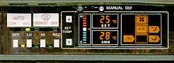

Automatic Climate Control Diagnosis[edit]
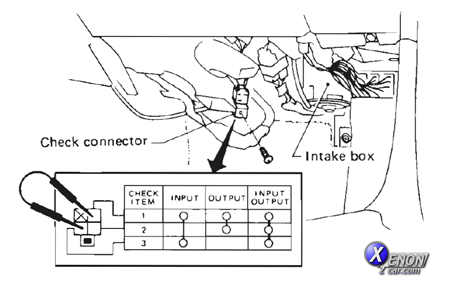
There are two parts to self-diagnosing the automatic climate control. The first part deals with the input system (sensors, etc). The second part deals with the output system (air-mix doors, air outlet doors, actuators, etc). Both parts are activated by shorting prongs on a connector found behind the Passenger side kick panel under the glove box. The connector is white/yellow, square, has three prongs, is not connected to anything, and has a metal bracket (with a screw hole) attached to it. Here is what the inside of the connector housing looks like - note the three prongs:
Input System[edit]
Once you find the connector, short the two prongs diagonally across from each other (the top right and bottom left in the picture above). The climate control must be ON for this to work.
Look at the display. The Set Temp window will show a number between 0 and 15. You can change this number by using the temperature setting buttons. It identifies which sensor you are looking at. The number in the ambient temperature window is your diagnostic code. Here is a break down of what the numbers and codes mean:
| Set Temp # | Checking Item | Diagnostic Code and Meaning |
|---|---|---|
| 0 | Foot temp. sensor | Ok if close to actual inside temp. 2°F (-17°C) - Open sensor 181°F (83°C) - Shorted sensor |
| 1 | Heat temp. sensor | Ok if close to actual inside temp. 2°F (-17°C) - Open sensor 181°F (83°C) - Shorted sensor |
| 2 | Floor duct temp. sensor | Ok if close to actual inside temp. 2°F (-17°C) - Open sensor 181°F (83°C) - Shorted sensor |
| 3 | Vent duct temp. sensor | Ok if close to actual inside temp. 2°F (-17°C) - Open sensor 181°F (83°C) - Shorted sensor |
| 4 | Defroster duct temp. sensor | Ok if close to actual inside temp. 2°F (-17°C) - Open sensor 181°F (83°C) - Shorted sensor |
| 5 | Water temperature switch | 2°F (-17°C) - water temp < 104°F 181°F (83°C) - water temp > 104°F |
| 6 | Sunload sensor | 32°F (0°C) to 104°F (40°C) — OK if increases with more light |
| 7 | Temp diff between foot and head | 32°F (0°C) — No difference 90°F (32°C) — 2°C difference 147°F (64°C) — 7°F difference |
| 8 | Feedback Potentio (Lower) | Difference from full cool to full hot: > 40°F (10°C) — Standard is 68°F (20°C) Refer to output step 1 |
| 9 | Feedback Potentio (Upper) | Difference from full cool to full hot: > 40°F (10°C) — Standard is 68°F (20°C) Refer to output step 1 |
Output System[edit]
This is a bit more involved. Short all three prongs together. The climate control system will now cycle through all of its modes over and over again. 1) Air Mix Doors:
Set the Temperature Set number to 8 and then 9. For each setting look at the numbers appearing in the Ambient Temperature window and feel the air coming out of the vents. Here is what you should see and feel:
104 and fully hot air for 8 sec
86 and lukewarm air for 4 sec
68 and fully cold for 4 sec
Most likely you will not see the exact numbers above. I believe, it is ok as long as the numbers are fairly close AND the difference between fully hot and fully cold numbers is no larger then 54 and no smaller than 18 From this point on, you no longer need to play with the set temperature buttons. You merely watch the system while it cycles through all its modes and check on things. Unfortunately, the best way to describe this part is through pictures and ASCII will not even come close. On the bright side, the rest of the tests mostly check the components that you can check by cycling your system through normal modes of operation manually. I will give a brief description. The systems are presented in the order that they are cycled through. 2) Outlets
Watch the system cycle through the different outlets and their combinations and check that the air is coming out of the same vent as is shown on the display. Also, make sure the air temperature is right (cold or hot when ac is on or off). The system should spend 4 seconds in each of the following: defrost, demist, bi-level, vent. 3) Intake door
Watch the intake door spring (I have not done this and don't yet know how) as the system spends 8 seconds in full recirculation, 4 seconds in partial recirculation, and 4 seconds with only outside air coming in. 4) Water cock
Watch the water cock (near the battery) and/or display, The water cock should be on for 8 seconds and off for 8 seconds 5) Compressor Clutch
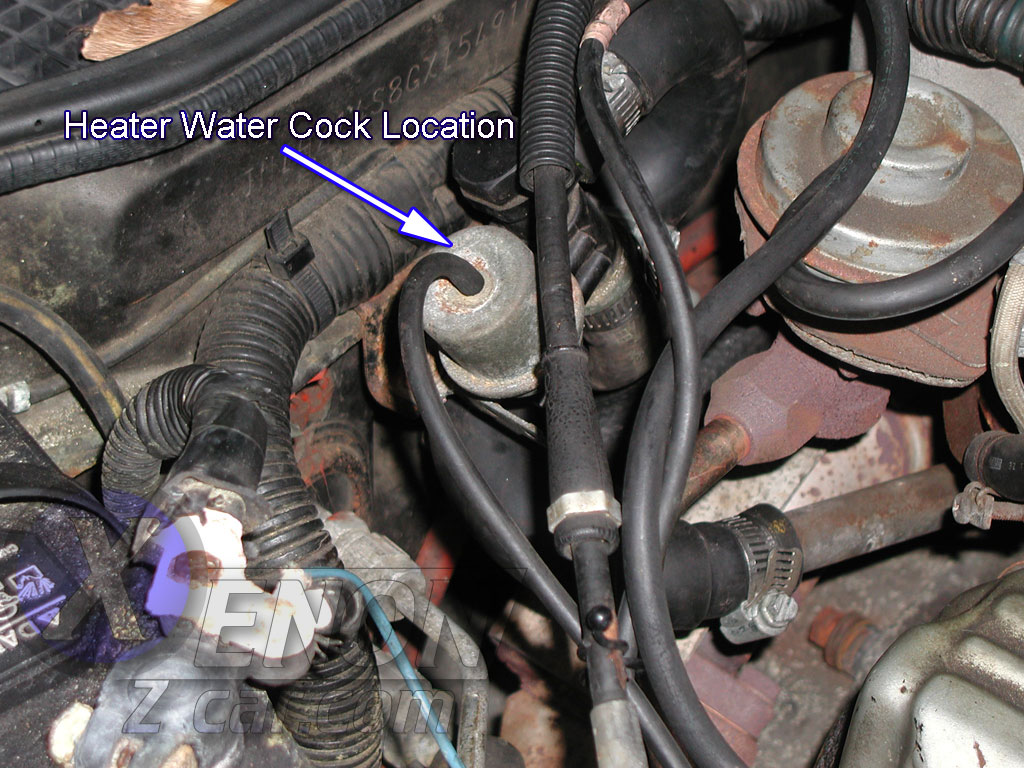
Should be off for 8 seconds and on for 8 seconds. Can watch the A/C compressor clutch and/or the display. 6) Blower motor
Watch it increase in 3 steps from off to full blast. Feel the vents and watch the display.
Hope this helps with troubleshooting the Factory Automatic Climate Controls in your Z.